Question 361
You are developing a new Python 3 API that needs to be deployed to Cloud Run. Your Cloud Run service sits behind an Apigee proxy. You need to ensure that the Cloud Run service is running with the already deployed Apigee proxy. You want to conduct this testing as quickly as possible. What should you do?
A. Store the service code as a zip file in a Cloud Storage bucket. Deploy your application by using the gcloud run deploy --source command, and test the integration by pointing Apigee to Cloud Run.
B. Use the Cloud Run emulator to test your application locally. Test the integration by pointing Apigee to your local Cloud Run emulator.
C. Build a container image locally, and push the image to Artifact Registry. Deploy the Image to Cloud Run, and test the integration by pointing Apigee to Cloud Run.
D. Deploy your application directly from the current directory by using the gcloud run deploy --source command, and test the integration by pointing Apigee to Cloud Run.
Question 362
Your company is planning a global event. You need to configure an event registration portal for the event. You have decided to deploy the registration service by using Cloud Run. Your company’s marketing team does not want to advertise the Cloud Run service URL. They want the registration portal to be accessed by using a personalized hostname or path in your custom domain URL pattern, for example, .example.com. How should you configure access to the service while following Google-recommended practices?
A. Configure Cloud Armor to block traffic on the Cloud Run service URL and allow reroutes from only the custom domain URL pattern.
B. Set up an HAProxy on Compute Engine, and add routing rules for a custom domain to the Cloud Run service URL.
C. Add a global external Application Load Balancer in front of the service, and configure a DNS record that points to the load balancer’s IP address.
D. Create a CNAME record that points to the Cloud Run service URL.
Question 363
You are building a Workflow to process complex data analytics for your application. You plan to use the Workflow to execute a Cloud Run job while following Google-recommended practices. What should you do?
A. Create a Pub/Sub topic, and subscribe the Cloud Run job to the topic.
B. Configure an Eventarc trigger to invoke the Cloud Run job, and include the trigger in a step of the Workflow.
C. Use the Cloud Run Admin API connector to execute the Cloud Run job within the Workflow.
D. Determine the entry point of the Cloud Run job, and send an HTTP request from the Workflow.
Question 364
You are developing an application that needs to connect to a Cloud SQL for PostgreSQL database by using the Cloud SQL Auth Proxy. The Cloud SQL Auth Proxy is hosted in a different Google Cloud VPC network. The Cloud SQL for PostgreSQL instance has public and private IP addresses. You are required to use the private IP for security reasons. When testing the connection to the Cloud SQL instance, you can connect by using the public IP address, but you are unable to connect by using the private IP address. How should you fix this issue?
A. Run the Cloud SQL Auth Proxy as a background service.
B. Add the --private-ip option when starting the Cloud SQL Auth Proxy.
C. Set up VPC Network Peering between your VPC and the VPC where the Cloud SQL instance is deployed.
D. Grant yourself the IAM role that provides access to the Cloud SQL instance.
Question 365
You are developing a custom job scheduler that must have a persistent cache containing entries of all Compute Engine VMs that are in a running state (not deleted, stopped, or suspended). The job scheduler checks this cache and only sends jobs to the available Compute Engine VMs in the cache. You need to ensure that the available Compute Engine instance cache is not stale. What should you do?
A. Set up an organization-level Cloud Storage log sink with a filter to capture the audit log events for Compute Engine. Configure an Eventarc trigger that executes when the Cloud Storage bucket is updated and sends these events to the application to update the cache.
B. Set up a Cloud Asset Inventory real-time feed of insert and delete events with the asset types filter set to compute.googleapis.com/Instance. Configure an Eventarc trigger that sends these events to the application to update the cache.
C. Set up an organization-level Pub/Sub log sink with a filter to capture the audit log events for Compute Engine. Configure an Eventarc trigger that sends these events to the application to update the cache.
D. Set up an organization-level BigQuery log sink. Configure the application to query this BigQuery table every minute to retrieve the last minute’s events and update the cache.
Question 366
You have a GKE cluster that has three TPU nodes. You are running an ML training job on the cluster, and you observe log entries in Cloud Logging similar to the one below. To identify the root cause of a performance issue, you need to view all stdout logs from the containers running on the TPU nodes. What should you do?
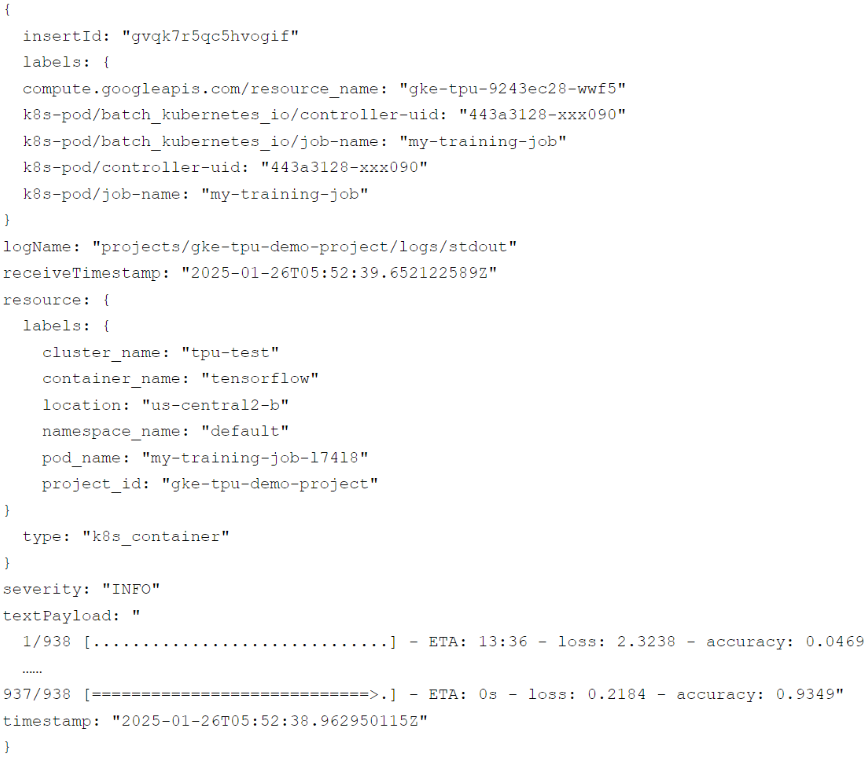
A. Run the following log query in Cloud Logging:

B. Run the following log query in Cloud Logging:

C. Run the following command in Cloud Shell:

D. Run the following command in Cloud Shell:

Question 367
You have a Cloud Run service that connects to a Cloud SQL Enterprise edition database instance using the default Cloud SQL connection. You need to enable more than 100 connections per Cloud Run instance. What should you do?
A. Increase the queries per minute quota limit of the Cloud SQL Admin API.
B. Increase the max_connection flag in Cloud SQL for PostgresSQL.
C. Upgrade to Cloud SQL Enterprise Plus edition.
D. Use Cloud SQL Auth Proxy in a sidecar.
Question 368
You are developing a new mobile game that will be deployed on GKE and Cloud Run as a set of microservices. Currently, there are no projections for the game’s user volume.
You need to store the following data types:
• Data type 1: leaderboard data
• Data type 2: player profiles, chats, and news feed
• Data type 3: player clickstream data for BI
You need to identify a data storage solution that is easy to use, cost-effective, scalable, and supports offline caching on the user’s device. Which data storage option should you choose for the different data types?
A. • Data type 1: Memorystore
• Data type 2: Firestore
• Data type 3: BigQuery
B. • Data type 1: Memorystore
• Data type 2: Spanner
• Data type 3: Bigtable
C. • Data type 1: Firestore
• Data type 2: Cloud SQL
• Data type 3: BigQuery
D. • Data type 1: Firestore
• Data type 2: Firestore
• Data type 3: BigQuery
Question 369
Your team developed a web-based game that has many simultaneous players. Recently, users have started to complain that the leaderboard tallies the top scores too slowly. You investigated the issue and discovered that the application stack is currently using Cloud SQL for PostgreSQL. You want to improve the leaderboard performance as much as possible to provide a better user experience. What should you do?
A. Re-implement the leaderboard data to be stored in Memorystore for Redis.
B. Optimize the SQL queries to minimize slow-running queries.
C. Migrate the database and store the data in AlloyDB.
D. Update Cloud SQL for PostgreSQL to the latest version.
Question 370
You are a developer at a large corporation. You manage three GKE clusters. Your team’s developers need to switch from one cluster to another regularly on the same workstation. You want to configure individual access to these multiple clusters securely while following Google-recommended practices. What should you do?
A. Ask the developers to use Cloud Shell and run the gcloud container clusters get-credentials command to switch to another cluster.
B. Ask the developers to open three terminals on their workstation and use the kubectl config set command to configure access to each cluster.
C. Ask the developers to install the gcloud CLI on their workstation and run the gcloud container clusters get-credentials command to switch to another cluster.
D. In a text file, define the clusters, users, and contexts. Email the file to the developers and ask them to use the kubectl config set command to add cluster, user, and context details to the file.
